Habit Tracker Spreadsheet: How to Build One That Survives a Missed Day
Set up a habit tracker spreadsheet in Excel or Google Sheets that keeps counting after a missed day: the layout, formulas, streak rule and what to track.
By Ultimate Habit Tracker by Cosmo Suite
Published · 5 min read
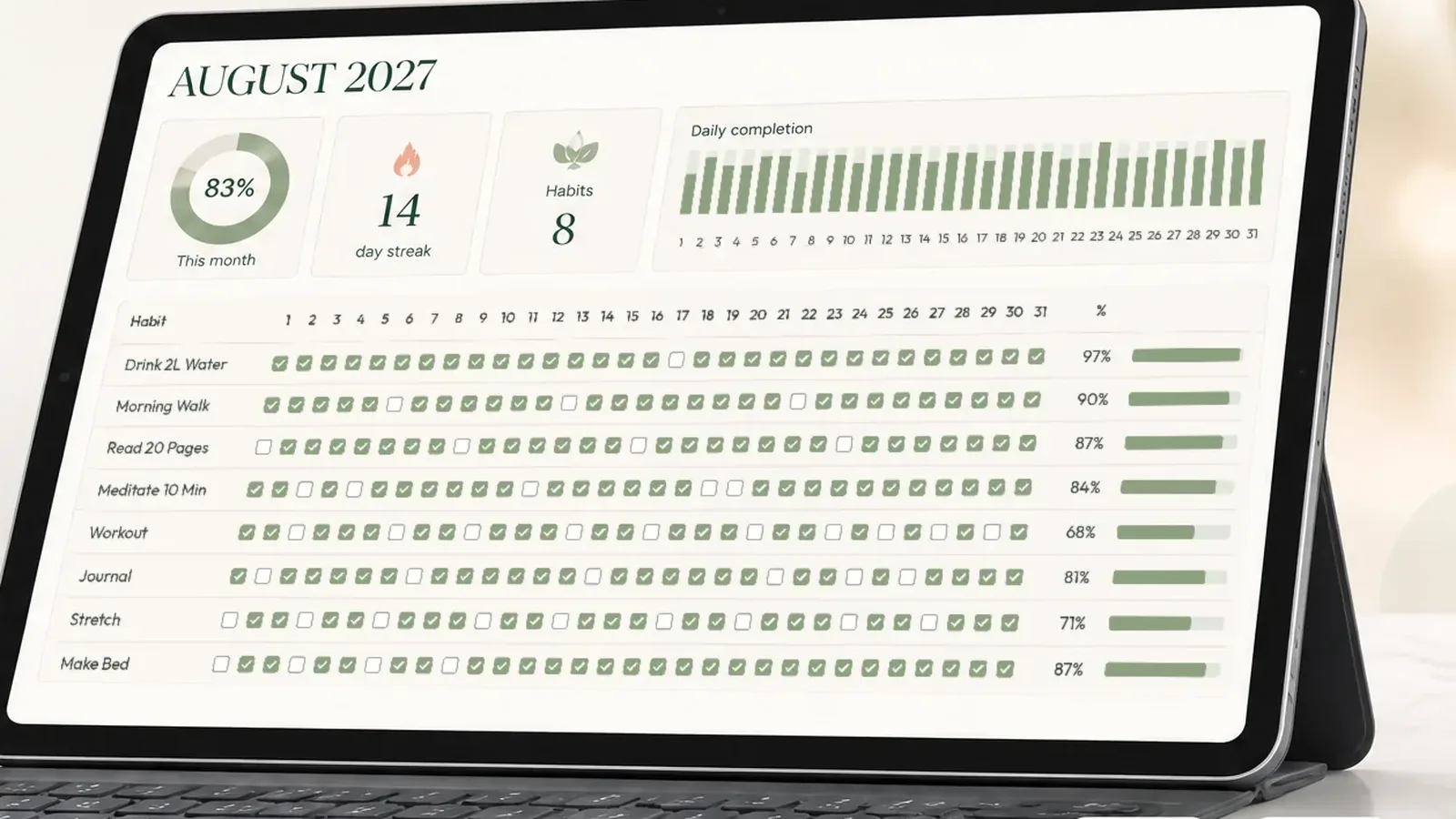
You set up a habit tracker on the first of the month, check every box for nine days, miss a Saturday, and the streak counter drops to zero. A week later you stop opening it. If that sounds familiar, the problem was probably never your discipline. It was the way the tracker scored you.
A habit tracker spreadsheet fixes that, because you decide the rules. In this guide you will build one in Excel or Google Sheets that keeps counting after a missed day: the layout, the few formulas it needs, a streak rule that stays honest without punishing you, and what is worth tracking beyond a yes or no.
Here is the angle most templates miss: a streak is a bad headline number. It measures your worst day, not your month. The tracker below puts your monthly completion percentage first and treats the streak as a bonus, which is closer to how habits actually form.
Why most habit trackers fail after the first missed day#
Most trackers, apps and printables alike, are built around one number: the current streak. It is motivating while it grows. The moment you miss a day it resets, and a month of effort suddenly reads as zero.
Research on habit formation points the other way. In a study from University College London, participants took between 18 and 254 days to make a new behavior automatic, and missing one opportunity did not materially affect the process. Consistency over weeks is what counts, not perfection over days.
So a tracker that lasts needs to:
- show what you did this month, even with gaps
- make a missed day cheap to recover from
- take seconds to update, so updating never becomes a chore
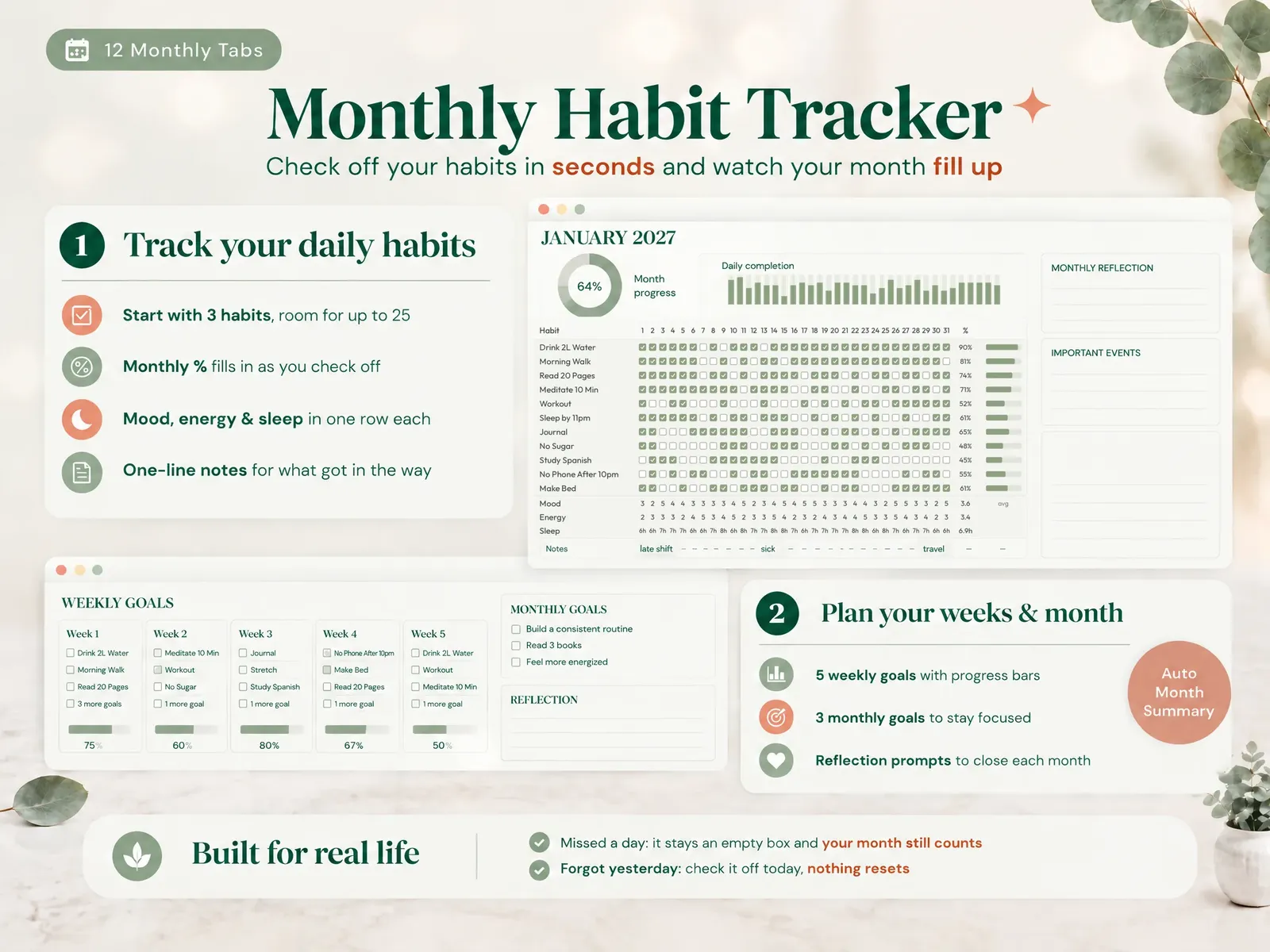
Habit tracker spreadsheet layout: one row per habit, one column per day#
Keep the grid simple. Every other feature hangs off it.
- Column A: habit names, one per row (start with three).
- Columns B to AF: days 1 to 31 of the month.
- Row 1: the dates. In Google Sheets,
=DATE(2026,10,1)in B1 and=B1+1across. - Cells: checkboxes. In Google Sheets use Insert, then Checkbox. In Excel 365 use Insert, then Checkbox, or a data validation list with a single ✓.
- One tab per month, so each month starts clean and old months stay as a record.
Checkboxes matter more than they seem. Typing an "x" or a "1" is small friction, but you repeat it for every habit, every day. A click is fast enough that checking off your day never feels like admin.
Four formulas that make every day count#
You need three numbers per habit and one for the month.
| What you want | Google Sheets / Excel formula (row 2) | Why it helps |
|---|---|---|
| Days done this month | =COUNTIF(B2:AF2, TRUE) |
The real measure of effort |
| Days so far | =MIN(DAY(TODAY()), 31) |
Compares like with like mid-month |
| Habit % this month | =COUNTIF(B2:AF2, TRUE) / MIN(DAY(TODAY()), 31) |
One missed day costs a few points, not everything |
| Month % (all habits) | =COUNTIF(B2:AF4, TRUE) / (ROWS(B2:AF4) * MIN(DAY(TODAY()), 31)) |
Your headline score |
Format the percentage cells with conditional formatting (green above 80 %, amber between 50 and 80 %, red below) so you can read the month at a glance. In Excel, use the same formulas; checkboxes return TRUE and FALSE there too.
A streak rule that does not punish a bad day#
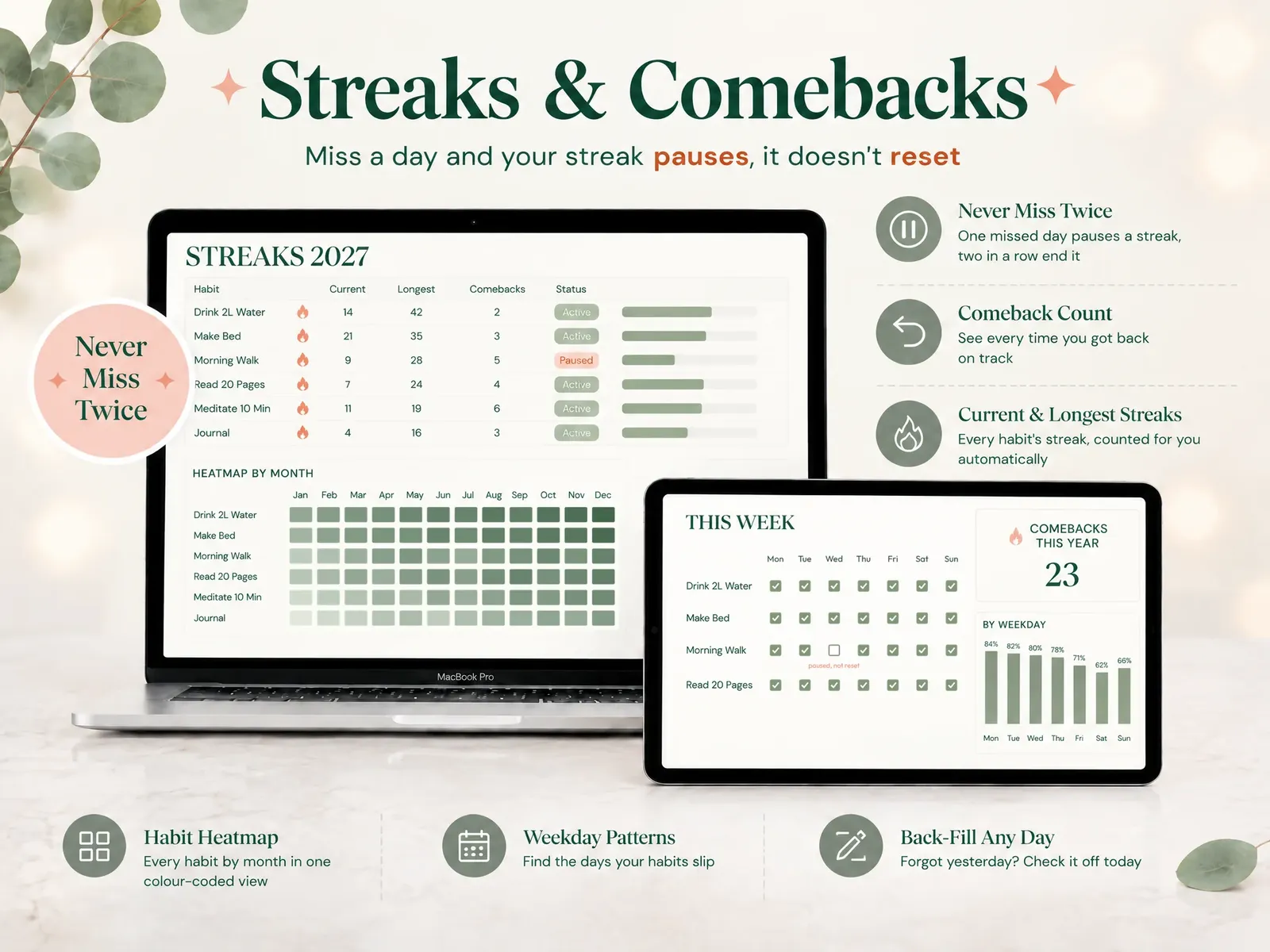
Streaks are still useful, as long as one miss does not erase them. The rule that works for most people is never miss twice: one missed day pauses the streak, two in a row end it.
You can apply it in a spreadsheet with a helper row. For each day, the streak value is:
- the previous day's streak plus one, if today is checked
- the previous day's streak unchanged, if today is empty but yesterday was checked
- zero, if today and yesterday are both empty
In Google Sheets, with checkboxes in row 2 and the helper in row 3, put this in C3 and fill right:
=IF(C2, B3+1, IF(B2, B3, 0))
Also count your comebacks: the times you returned after a miss. A comeback is the habit doing its job, and seeing that number grow changes how a missed day feels.
If you would rather not maintain helper rows, the Ultimate Habit Tracker has this rule built in: 21 tabs in Excel and Google Sheets with a monthly grid for up to 25 habits, streaks and comebacks counted for you, mood, energy and sleep rows, a dashboard, annual goals and a year in review.
What to track besides yes or no#
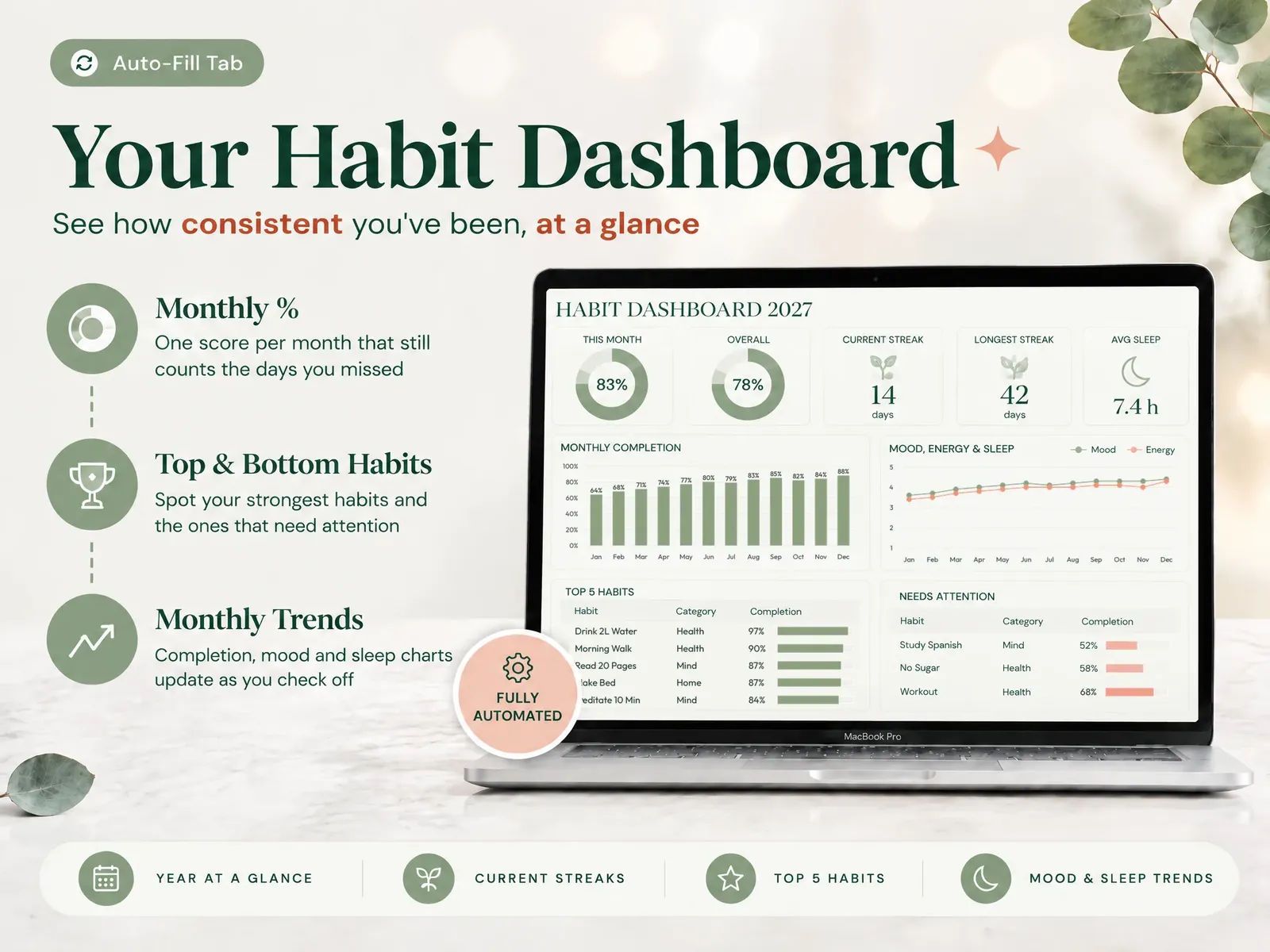
A checkbox tells you whether you did it. A few extra rows tell you why some weeks go better than others:
- Mood (1 to 5)
- Energy (1 to 5)
- Sleep (hours)
- A one-line note for what got in the way
After a month you can compare your best weeks against your sleep or energy. You do not need complex charts; a simple line chart of month % next to average sleep is often enough to spot the pattern.
Excel or Google Sheets: which should you use?#
| Situation | Better choice | Why |
|---|---|---|
| You check off on your phone most days | Google Sheets | The mobile app is quick and syncs everywhere |
| You work offline or prefer desktop software | Excel | Full features without a connection |
| You share a tracker with a partner or friend | Google Sheets | Live sharing is built in |
| You want heavier charts and formatting | Excel | More chart and formatting options |
| You are not sure yet | Either | Stick to the formulas above and the file works in both |
How to start: three habits, one week#
The most common mistake is starting with fifteen habits. The sheet fills with empty boxes, the month % looks bad, and the tracker becomes a source of guilt.
- Pick three habits that take under ten minutes each.
- Set a target days per week for each (five out of seven is a fine start).
- Check off at the same moment every day, for example right after dinner.
- Review on Sunday: which habit slipped, and what got in the way?
- Add a new habit only once the first three happen without much thought.
Where this advice comes from#
The layout, the monthly percentage and the never-miss-twice streak rule follow the monthly and streak tabs of the habit tracker sold on this site, rewritten as plain formulas so you can build them yourself. The figures on habit formation come from the published University College London study linked above. Nothing in this guide rests on invented testing or user numbers.
Frequently asked questions
Is a habit tracker spreadsheet better than a habit app?
It depends on what makes you quit. A spreadsheet is a file you own, with no account, no notifications and no subscription, and you can change any rule you like. An app is quicker to set up and can remind you. If apps lost you because a broken streak felt like failure, a spreadsheet that counts a monthly percentage is the better fit.
Can I use the same habit tracker in Excel and Google Sheets?
Yes, as long as you stick to functions both support, such as COUNTIF, COUNTA and simple checkbox columns. Avoid Excel-only features like some dynamic array functions if you plan to open the file in Google Sheets.
How many habits should I track at once?
Start with three. A short list means checking off your day takes seconds, which is what keeps you opening the sheet. Add a new habit once the first ones happen without much thought.
What should I do when I miss a day?
Leave the box empty and check off today. A good tracker counts the days you did show up, so your month still reflects your effort. The only rule worth keeping is not to miss twice in a row.
How long does it take for a habit to stick?
Longer than the popular 21 days. In a well known University College London study, the time for a new behavior to become automatic ranged from 18 to 254 days, with a median of 66 days, and missing a single day did not materially affect the process.
Conclusion#
A habit tracker spreadsheet works when it measures your month, not your worst day. Put the monthly percentage first, use a never-miss-twice streak, keep the daily update to a few clicks, and start small. Build it yourself with the formulas above, or get the ready-made version and start checking off today.